 |
 |
 |
Using the Teleputas HUD
Getting started:
If you are not on the same sim as the escort when you initially hire her, then first offer her a teleport to your current location in the normal Second Life way. She will accept the offer. Once you are within 20m of the escort you can pair with her and use the HUD to control her.
This is new in version 3.0. Previously you did not need to pair with the escort because each escort used her own HUD. The downside of this was that you had to use a different HUD for each escort, which led to a lot of screen clutter if you wanted to rent two girls simultaneously. Now you can control as many girls as you like with the same HUD and use it again and again.
To pair, press the cog wheel icon at the top of the HUD and choose "Scan" from the menu. The names of any escorts you are currently renting will appear in the hover text, together with the time left for each one. You can use one HUD to control as many escorts as you like. To switch between escorts, press the cog wheel icon and then the "Switch" command. You can stop the scan by pressing the "Stop Scan" button or leave it to finish scanning after one minute.
How to sit your Teleputa:
1) Stand NEAR but DO NOT SIT on the furniture you want to use.
2) Press the SIT button on the HUD and find the furniture in the menu.
3) If you can't find the furniture in the list, press the OTHER button and copy in the full name of the furniture from its properties window.
4) Repeat steps 2 and 3 if necessary until your escort is sitting where you want her.
5) Finally you also sit on the furniture.
Notes:
New in Version 3.0: all the Teleputas escorts are now fitted with RLV relays, so you can sit them on RLV furniture or use it to capture them.
The furniture menu list includes all objects in a five meter radius from your (not the escort's) current position. This list is then filtered down to only include items that have certain key words in their names such as "bed", "sofa", "chair" etc. Your item will not be in the list if its name does not include one of these key words. It is also possible that the item you are looking for is excluded because the search found too many items (it is limited to 32 results). Crucially, the furniture detector is not able to find any furniture you are currently sitting on yourself (this is because it becomes an attachment to your avatar rather than an independent object in its own right). This is why step 1 tells you to stand NEAR the object but to NOT sit on it.
Important: frequently the avatar does not manage to sit on the first attempt. She might move next to it, but not actually sit down. The usual reason for this is that she was too far away from the object to begin with. If it happens simply repeat steps 2 and 3, either pressing the menu button or pressing "Other" and pasting in the object name.
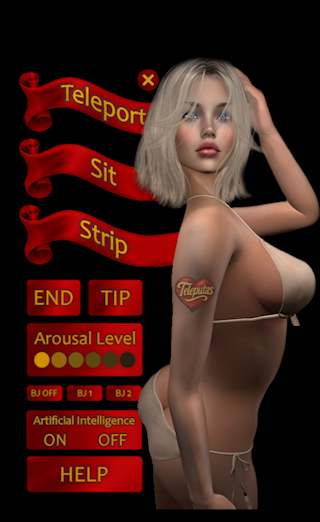
The rest of the buttons are described below. Usually the button operations are fairly instantaneous, but sometimes, when the server is running slowly, there can be a delay of up to a minute using any of them. This is a scripted HUD, so you will have to be on land that allows the running of scripts to be able to use it (most places do allow running scripts).
Teleport:
Use this button to teleport the escort to you over short distances. For example it is useful to teleport her closer to the furniture you want to sit her on. To teleport her between sims or when she is out of scanning range then just invite her to accept a teleport in the normal Second Life way.
Strip:
The strip button lets you remove clothes by area: top (t-shirt, bra etc.), bottom (skirt, panties etc.) or shoes. It does not currently allow any more precision than this, you can't remove specific garments. The +All button puts all her clothing back on.
New in version 3.0: the escorts can now have different outfits. To change outfits, just press the [Otufits] button on the Strip menu and choose the one you want. As this is a new feature, some of the girls may just have one outfit to begin with. Feel free to suggest any outfit wishes to the escort so she can put them on her shopping list. If you want to gift any of the girls with a new outfit make sure it is mesh, because unfortunately BOM or system clothing will not work with the HUD.
End:
Use the End button to terminate the rental if you have time left over. The escort will calculate any time left and refund you the appropriate amount of money.
Tip:
If you try to tip your escort directly it will initiate a new rental period or extend the present one, which may not be what you wanted. If you want to tip her without buying any extra time use this button. A spherical tip jar will appear above the escorts head. You will have one minute before it disappears. In that time you can pay the tip jar and it will go directly to the escort without activating the rental software.
Arousal buttons:
The arousal buttons can be used to set a state of sexual arousal from zero to five, zero being the first button on the left, the highest state being the button on the far right. Arousal states affect:
| Moaning and sex noises: | Should work for all escorts |
| Facial expressions: | Should work for all escorts |
| Vaginal dilation: | Should work for most escorts, depending on whether their mesh vagina acccepts API instructions. |
| Mama Allpa: | When the escort is wearing Mama Allpa she will open automatically in the highest three states of arousal. |
Blowjob buttons:
Use the buttons BJ1 and BJ2 to open the escorts mouth ready to receive anything you care to insert. BJ0 sets it back to normal.
Artificial Intelligence:
The escorts AI can be turned on or off using these buttons. Note that all AI conversations with the escort have to be in private IMs. Activating this function will not make her respond to local chat. On activating AI you will get a confirmation message saying whether the mode is On or Off. When chat mode is on she should respond dynamically to anything you say to her.
For the best experience please remember that the AI cannot see, so you must always first describe a place, object or action that you wish to discuss in your RP. Asking “Do you like my home” is pointless, “Do you like my log cabin here in the woods?” is better. Also, they speak many languages so you do not have to restrict yourself to English.
Please report any bugs or problems to Zackanory. Refunds will be given where appropriate.